
System Requirements
The topics in this section list the software prerequisites and supported deployment architectures for Reserves.
Quorum recommends running Reserves in Azure.
Component Overview
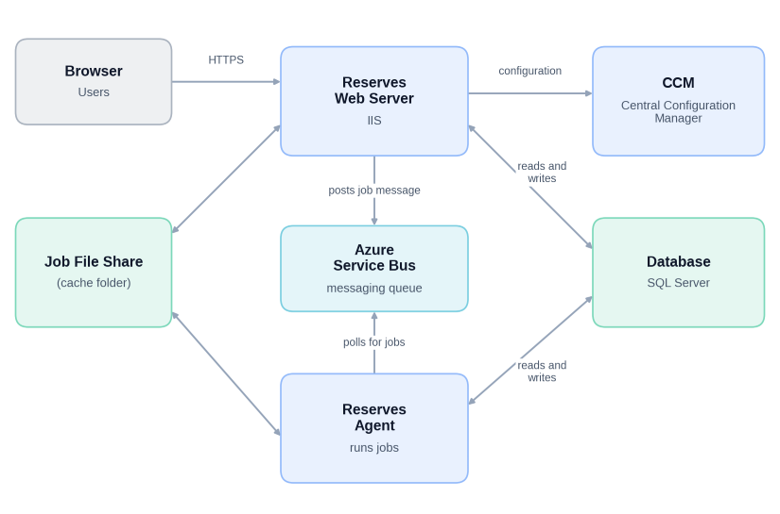
The diagram below shows a high-level view of the Reserves components. The deployment architecture topic describes the supported topologies (see Deployment Architecture).
| Component | Description |
|---|---|
| Reserves Web Server | IIS server that hosts the Reserves web application and services. |
| Reserves Agent | Runs Reserves jobs, including long-running data loads, and connects directly to the database. Runs on the same server as the Reserves Web Server, or on one or more separate servers to provide additional capacity or availability. |
| Job File Share (cache folder) | Shared location, also called the cache folder, where the Reserves Web Server places jobs for the Reserves Agent to pick up. Not required when the Reserves Web Server and Reserves Agent run on the same server. When they run on separate servers, the share can be specified as a UNC (Universal Naming Convention) path, for example '\\servername\sharename'. |
| Azure Service Bus | Azure platform-as-a-service (PaaS) messaging service that carries job notifications and status messages between the Reserves Web Server and the Reserves Agent. Messages carry operational information about jobs, such as identifiers, descriptions, and status. |
| Central Configuration Manager (CCM) | Reserves configuration application. Holds settings such as the database and Azure Service Bus connections and the file paths that Reserves uses. |
| Database | SQL Server or Azure SQL database that holds the Reserves application schema and data. All data handling is performed within the database. |