Report Overview
Use this report to view information about changes in your reserves at a specified date (snapshot), based on the Reserve Category Group and Product Group you select for the report. This report is very similar to variant 2 of the Standard Reserves Report (001 Standard Reserves Report (Non Group Options). Two additional fields have been added to this report: Ultimate Recoverable, and Cum. Prev. Production (cumulative previous production). The table generated by this report will show:
- A summary of the balances and adjustments for all objects included in the report, categorized by reserve category.
- The opening balance, closing balance, and difference (adjustments) for each product from the product group selected for the report. Cells in the Difference rows turn green to indicate a positive difference and red to indicate a negative difference.
- The total production for each product from the product group selected for the report.
- The Ultimate Recoverable for each product included in the report.
- The cumulative production from the previous year for each product.
Example Report
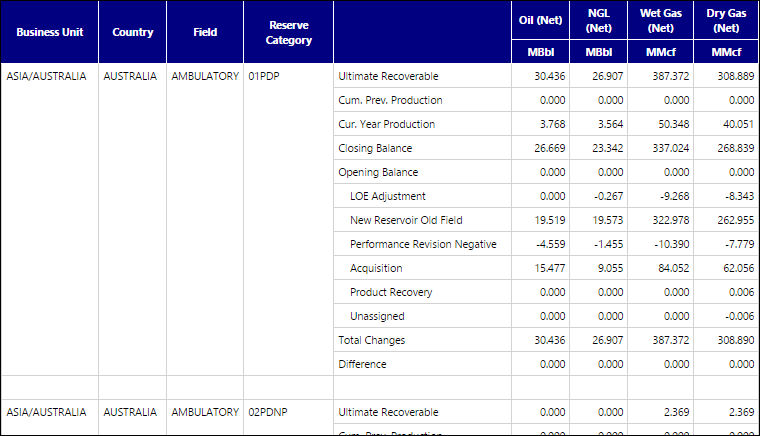
Click image to expand or minimize.
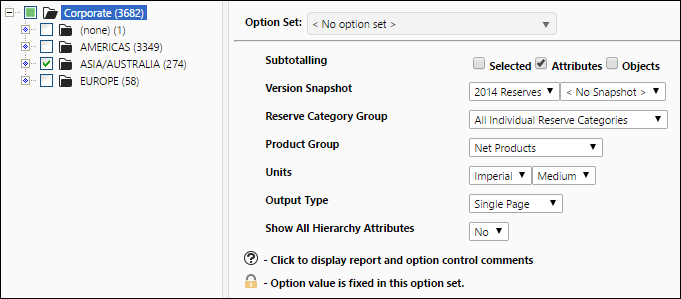
Report Options