Report Overview
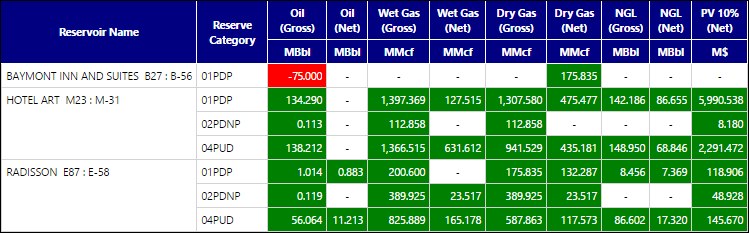
The Unbalanced Reservoirs Report is a useful tool for identifying unbalanced reserves in your hierarchy. Only unbalanced reservoirs will be listed in the completed report. This means that you can use this report to filter a large number of hierarchy objects, and the completed report will only include those objects with unbalanced values. The completed report will show:
- The name of the reservoir along with its unbalanced value(s).
- The reserve category corresponding with the unbalanced values.
- The product associated with the unbalanced value. Cells in the product columns turn green to indicate a positive balance and red to indicate a negative balance.
All of the products configured in your instance will be displayed in this table, even if only one product is not balanced.
Example Report
Report Options