
Variables
This panel lists the available variables and is divided into three sections:
- Module Variables: Variables currently used in the module being edited.
- Regime Variables: All of the variables in the regime.
- Temporary Variables: Variables used locally in the module code as part of calculations, and not used elsewhere.
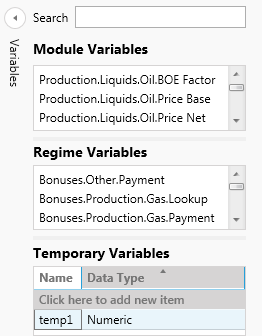
To insert a variable from the variables list boxes into the Logic Editor, double-click in a variable, or drag and drop it. Alternatively, you can start typing the first characters of a a variable name in the Logic Editor and use the auto-completion.
Ordinary variables are shown in dark gray and enclosed in square brackets, for example '[Production.Liquids.Oil.Volume]'.
Temporary variables can be added in the Temporary Variables list by clicking in Click here to add new item. It is necessary to specify a Name and Data Type (Numeric, Date, Text, or Periodic Numeric).
Temporary variables are inserted in the module code using the '@' symbol as a prefix and are shown in purple.
Configuring Temporary Variables in the Logic Editor
You can configure new temporary variables for the module by typing them initially in the Logic Editor and then using the context menu function Add Variable As, and select the data type in the sub-menu. For a configured variable you can use Add Variable As in the context menu to modify the temporary variable's data type.
The context menu function Add All Temporary Variables As can be used to configure all of the currently-unconfigured Temporary variables at the same time, but only one data type can be selected.