
Canvas
The canvas contains calculation modules and calculation phases used by the regime, and allows you to build a calculation sequence using modules from the module library. Modules are represented by colored rectangles and phases by vertical lines, and are organized by dragging and dropping. For more information on working with modules and phases see Create a module and Calculation Phases.
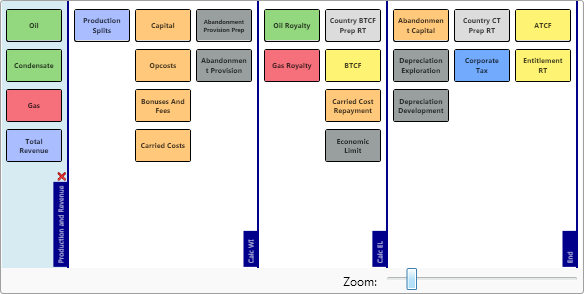
There is a color-coding convention for modules which is used in the regimes that are provided by Quorum Software:
| Color | RGB color code | Used for modules |
|---|---|---|
| 93d77e | Liquids (oil): production, royalty, cost recovery, profit oil | |
| f6707b | Gas: production, royalty, cost recovery, profit oil | |
| a9bdff | Production; Revenue: Total production, other revenue | |
| ffc87b | Costs: capital, opcosts, bonuses, abandonment, carry | |
| 999f9f | Subsidiary calculations: abandonment provision, economic limit, depreciation | |
| dcdcdc | Preparation modules: overlay modules that precede standard modules such as Cost Recovery, BTCF and Corporate Tax | |
| 72aafe | Tax: corporate tax, special taxes, VAT | |
| fff373 | Overlays: Cash flow, entitlement, reporting | |
| 918fea | Other: DMO, Duties, Participation, Local Taxes |
Generally, the canvas will contain a mixture of standard modules (those used by all or many regimes) and regime-specific modules (those unique to the regime or country). To add a module to a regime, drag the module from the Modules library on the right and drop it onto the canvas in the desired position. The canvas view can be enlarged by clicking the collapse/expand buttons to collapse the Settings and Search Module panels.
While dragging a module, a red line will appear to indicate where the module will be inserted. The position of each module is critical as it dictates the calculation sequence.
The blue vertical lines mark the calculation phases, which divide the calculation sequence into sections. Calculations are completed for all periods and all modules in each phase, before 'crossing the line' and starting the next phase.
By default, regimes have three phases, although you can add more. For more information see Calculation Phases.