
Currency and Discounting presets
These presets should not be confused with Report Options presets; see Report Options presets.
Currency and Discounting presets are stored configurations which are used to configure currency and discounting settings when running a report. They are used both for Result Set reports, and for scratchpad calculations on projects (see the section at the end of this topic, for that case).
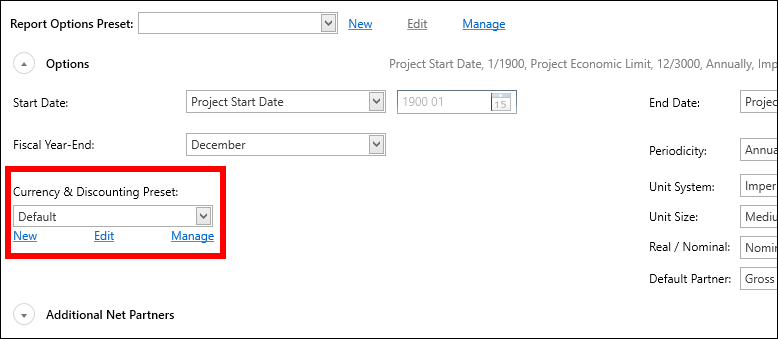
The presets are shared by Economics users in the same tenant, and access is controlled by permissions on each preset; see below for details.
Note: A Currency & Discounting preset selection is stored in each Report Options preset. When a Report Options preset is active you can only change the Currency & Discounting preset by editing the Report Options preset.
The 'Default' preset exists as a default; it can be renamed or deleted. At least one preset must exist.
Currency & Discounting settings
The following table shows the settings that are stored in each Currency & Discounting preset.
| Setting | Description |
|---|---|
| Currency Deck | Select a currency deck in the drop-down, or check the Use hierarchy deck box to use the currency deck that is active for the hierarchy. |
| Currency | The currency that will be used in the report. The available currencies will depend on those included in the active currency deck. |
| Inflation Date | The date from which inflation rates will be applied. |
| Treat values as nominal prior to inflation date | Check the box to apply this option. |
| Discount Rates | The discount rates that can be applied. |
| Discount Date | The date from which discounted rates will be applied. |
| Discount Method | The periodicity at which discounted rates will be applied. Choose from Monthly, Annual Start, Annual Mid or Annual End. |
| Do not apply discounting prior to discount date | Check the box to apply this option. |
Create a Currency & Discounting preset
Click the New button under the preset selector in the Result Set Reports screen. The New Currency & Discounting Preset window will open.
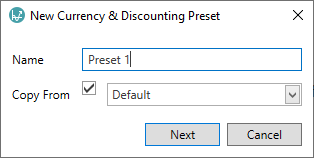
Enter a name for the preset. To copy settings from an existing preset, check Copy From and use the drop-down menu to select a preset.
Click OK, and the Edit dialog will appear.
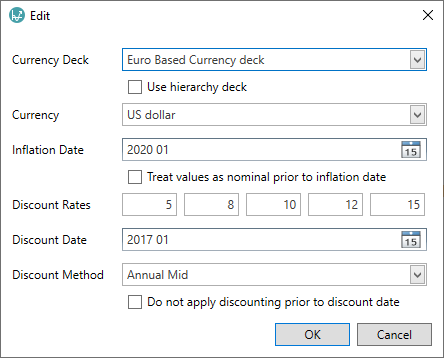
Fill in the fields as described in the settings table above. Then click OK to close the dialog and save the preset.
Edit a Currency & Discounting preset
To edit a preset, select it in the selector field and click the Edit button underneath to open the Edit Currency & Discounting Preset dialog. Click OK in the dialog to save your changes.
Manage the Currency & Discounting presets
Click the Manage button underneath the preset selector and a dialog will open.

From here you can Rename and Delete presets. Select one preset in the list and then click one of the buttons. At least one preset must exist.
Permissions
You can use the Permissions button in the Manage Currency & Discounting Preset dialog to edit the permissions for a preset.
When a preset is created, 'Full Access' permissions are granted to the user who created the preset (and to Administrator users). No other users or workgroups are granted permissions by default.
Using presets in Scratchpad Reports
Currency & Discounting presets are used to apply settings for 'scratchpad reports' on single projects, in the Manage Inputs workspace. See Scratchpad calculations.
You can add, edit and manage presets using the
buttons in the Reports tab on the ribbon: click the
New Currency & Discounting Preset button,
or the Manage Currency & Discounting Preset button,
or select the required preset in the
dropdown selector and click the
Edit Currency & Discounting Preset button.