
HTML-specific export options
When exporting a document, you can define HTML-specific exporting options using the following dialog:
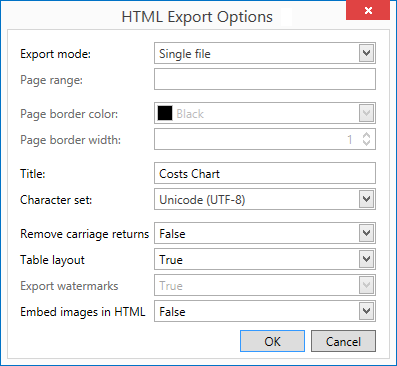
| Option | Description |
|---|---|
| Export mode |
The following modes are available:
|
| Page range | Specify the pages which will be included in the resulting file. Separate page numbers with commas; set page ranges using hyphens. |
| Page border color | Choose the color for the page border from the available palettes. |
| Page border width | Define the page border width. |
| Title | Enter the required document title. |
| Character set | Define the character set for your HTML document. |
| Remove carriage returns | Set to True if required. |
| Table layout | Set to True to select a table layout. |
| Export watermarks | Set to True to include watermarks (if they exist). |
| Embed images in HTML | If set to True, images in the report will be embedded in the resulting HTML file as binary code. Otherwise, images will be included as image files located in a separate folder. |