
System requirements for the Aucerna Execute Server, Database and Clients
There are four parts to an Aucerna Execute installation:
- An Aucerna Execute database, deployed on an Oracle or SQL Server database server.
- An Aucerna Execute server component (Windows service), deployed on a PC such as an application server.
- The Aucerna Execute network components, deployed on a network file share.
- The web browser (running on desktop and mobile devices) accesses the Aucerna Execute Service.
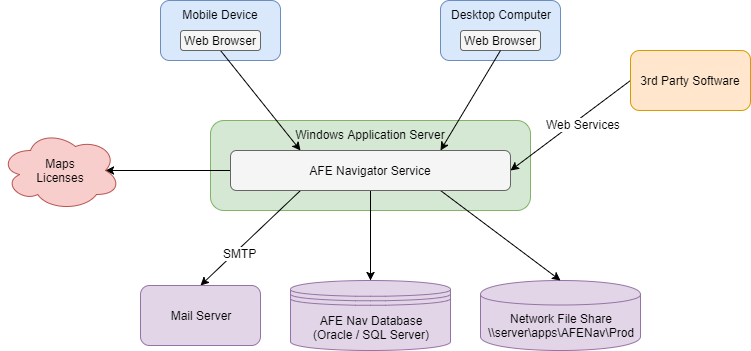
Click image to expand or minimize.
Some, or all, of the infrastructure above may be duplicated for your PRODUCTION and TEST environments.
Workstation Requirements
The majority of the Aucerna Execute user interface is accessed through the web browser. Aucerna Execute supports the following common browsers and versions:
- Internet Explorer 11 and higher
- Firefox
- Google Chrome
- Safari
- Mobile browsers such as Mobile Safari (iOS), Chrome (Android).
PDF viewing software (such as Acrobat Reader) is required to view “printed” AFE forms.
Microsoft Excel is required to view many data exports from Aucerna Execute.
Server Requirements
The Aucerna Execute server component (Windows Service) must be installed on a PC dedicated to Windows services within your organization, such as an application server. This machine must be reliably accessible to all workstations where the Aucerna Execute client may run.
- System: 64-bit dual/quad core processor (physical machine or virtual)
- Memory: 8 GB RAM or more (in addition to base OS requirements). Large environments ((> 50,000 AFEs) will need 16GB of RAM
- Disk Space: 2GB (application is about 100MB + temporary space)
- Operating System: Windows Server 2008 (64-bit), Windows Server 2008 R2 (64-bit), Windows Server 2012, Windows Server 2012 R2, Windows Server 2016
- .NET Framework: 4.6.2
- Internet: Requires outbound internet access (HTTP and HTTPS)
Network File Share
Aucerna Execute requires a shared area on your network with file and folder permissions set appropriately (see the Installation and Upgrade Guide for more information) for access to shared files such as desktop program files, shared reports, archived forms, etc.
- 500 MB (for each environment) + space for attachments
- By default, this network file share also stores documents attached to AFEs. This can be changed after installation.
Mail Server
In order to user Aucerna Execute’s email notifications, a mail server that allows the Aucerna Execute service to send email via SMTP is required. If necessary, Aucerna Execute can be configured to use authenticated SMTP and SSL (STARTTLS only).
Database
A database server, running Oracle 11g, Oracle 12c, SQL Server 2012 or SQL Server 2016 (or higher), with approximately 50 MB of space per 1000 AFEs.
Aucerna Execute connects to the database using a single service account and manages user permissions within the Aucerna Execute service. There are no per-user database accounts required or used by Aucerna Execute. The service account used by Aucerna Execute must have the ability to modify the Aucerna Execute schema (DDL) as this is required in order to add custom fields in Aucerna Execute.