
Analysis and documentation of Aucerna Execute Security
Overview
This document is intended to provide detail on some of the security considerations for deploying Aucerna Execute.
User Accounts
Aucerna Execute maintains a list of named user accounts. These user accounts include all browse users, originators, reviewers, approvers and administrative users. These user accounts may be synchronized with another system to minimize maintenance and they may also be linked to Active Directory to avoid the need for a password based Aucerna Execute login (see Single Sign-on / Active Directory Integration).
Aucerna Execute maintains its own list of users for several reasons:
- User information in Aucerna Execute contains rules around the review and approval process which are complex and usually not present in existing services in a way that Aucerna Execute could use.
- Database objects such as AFEs, business rules, audit logs, etc. must reference these users. Aucerna Execute needs to be able to control changes to these records to preserve the integrity of this data. (eg. a user being removed from the source system would compromise the history for any rule or AFE referencing that user)
- Aucerna Execute needs to be able to stand on its own, we can’t expect all customers to provide a user management system we can use.
Synchronizing User Accounts
The list of users in Aucerna Execute can be synchronized with a list of users in another system so that new additions, deletions/inactivations and updates are automatically propagated into Aucerna Execute. This integration process runs against a database table and can work with any data source whose data can be presented to Aucerna Execute at the database level.
We have clients who have configured this integration with Active Directory so that all users belonging to an “AFE Nav User” AD group are automatically created and maintained within Aucerna Execute.
Single Sign-on / Active Directory Integration
Aucerna Execute’s Single Sign-on behavior allows users who are already authenticated on the Windows domain to be immediately signed in to Aucerna Execute without being required to provide additional credentials.
- A user opens Aucerna Execute or clicks a link to an AFE from an email notification
- The browser confirms the network identity of the user to the Aucerna Execute Service via. NTLM (this operation is handled by the underlying Windows HTTP.SYS)
- Aucerna Execute verifies that user has a valid Aucerna Execute user account
- Aucerna Execute verifies that the user is active within Active Directory
- Aucerna Execute creates a session for the user and generates an Authentication Token (25-byte random string) which is used on all subsequent API calls within that session
User accounts in Aucerna Execute can be linked to their Active Directory account which allows for this automatic/single sign-on behavior. This is done through the user management screen. This link can also be created and maintained by the User Synchronization process (see Synchronizing User Accounts).
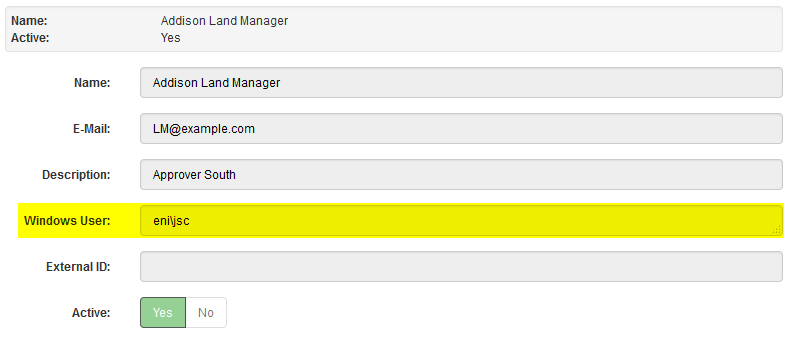
Click image to expand or minimize.
Single sign-on is only available within Desktop browsers within the internal network. The Device Pairing functionality allows users to “pair” their mobile device with their Aucerna Execute account to get a similar automatic login behavior on those devices (see Mobile Devices).
Aucerna Execute will verify that any user who is linked to an Active Directory account is active (both in Aucerna Execute and also in Active Directory) before allowing that user to login or resume and long-term sessions. This check also applies for paired mobile devices.
Primary AFE Attributes
During the configuration of Aucerna Execute a set of special fields (The “Primary AFE Attributes”) are chosen and these attributes drive most of the business work-flow in Aucerna Execute (review work-flow, approval work-flow, create permissions, view permissions, and valid GL accounts). These Primary AFE Attributes often include information like: AFE Type, Area, Field, Business Unit, Project, Operated? and Budgeted?. Most rules in the system are then built against these “Primary AFE Attributes” (i.e The approvers for any operated drilling AFE raised in the area “Lubbock” are …).
AFE Creation Permissions
By default users in Aucerna Execute are not able to create AFEs. Create Rights are configured by administrators with the “Manage Create Rights” privilege and control whether a user can create new AFEs and, if so, which combination of Primary AFE Attributes that user can use. This allows you to restrict users so that they can only create AFEs in their particular area of responsibility.
Approval and Review Privileges
Aucerna Execute supports assigning review (contributor/editor) privileges and approval privileges to users based on rules within Aucerna Execute. These rules can be based on any information on the AFE such as AFE Type, business unit, country of operation, total estimates, etc. When a user routes an AFE for review, or releases it for approval, Aucerna Execute evaluates these business rules and assigns the required reviewers and approvers automatically. This assignment can not be altered by the user.
The maintenance of these review and approval rules is limited to administrators with the “Manage System Review Rules” and “Manage Approval Rules” privileges.
View Permissions
By default, any active user of Aucerna Execute can see any AFE. In situations where this is not desirable Aucerna Execute supports view rights which allow an administrator to limit which AFEs a user can see based on the Primary AFE Attributes. This allows, for example, limiting visibility to a user’s own area of responsibility or limiting the visibility of tight AFEs to a smaller subset of users. View rights are honored through Aucerna Execute including the browse and reporting tools. These rules are maintained by an administrator with the “Manage View Rights” administrative privilege.
Administrative Privileges
Aucerna Execute contains around 100 fine-grained administrative privileges that grant access to specific administrative functions (such as managing business rules, AFE maintenance, etc). These administrative privileges can be grouped into administrative roles (ie. AFE Super User) and then users assigned to administrative roles.
The maintenance of administrative roles is limited to administrators with the “Administrator Role Configuration” administrative privilege.
Document-Level Permissions
Aucerna Execute allows for the configuration of document (AFE, users, partners, accounts, areas, etc.) permissions to have more control over who can create, view, delete and edit documents. This can allow more fine grained control over creation/editing/deletion/viewing of master data (eg. An administrator for a particular business unit can only modify user records for users within that business unit). These permissions are enforced at the API level so they apply consistently to the user interface and any external systems.
Changes to this configuration are limited to administrators with the “Edit Document Config” privilege.
Field Permissions
Aucerna Execute allows an administrator to customize permissions at the field level. This allows for fields that are only editable by a certain user (or group of users), or only editable at a certain point in the work-flow. These permissions are enforced at the API level so they apply consistently to the user interface and any external systems.
Changes to this configuration are limited to administrators with the “Edit Document Config” privilege.
Audit History
All edits to the AFE and most master data/business rules (including approval/review rules and document permissions) are captured in a complete audit history for that record. The audit history is visible within Aucerna Execute. There is nothing a user, a reviewer, an administrator, or an API user can do to one of these records that does not leave an entry in the audit history. For performance reasons, this audit history information is stored sparsely in separate tables alongside the main data tables.
The API, The Web Server and SSL
The Aucerna Execute service consists of a standalone WCF Windows Service that serves both the static content (HTML, CSS, images, Javascript) and the Aucerna Execute APIs. Aucerna Execute makes used of the underlying HTTP.SYS to serve content and APIs and to provide support for HTTPS.
APIs are accessible though JSON, SOAP or XML over HTTP. Aside from the login APIs, all APIs require an “Authentication Token” (a 25-byte random string generated upon a successful login) in order to invoke those APIs. Aucerna Execute wraps all API invocations with an Authentication Token check to ensure that no underlying code is called unless a valid Authentication Token is presented.
All API methods enforce the permissions granted to the user for whom the Authentication Token was generated. There is no way to circumvent the system controls by manually invoking API methods directly.
Most clients choose to disable password based logins so that users must login using one of the following two options. This strategy ensures that no user generated credentials can be used to authenticate with Aucerna Execute’s APIs which is especially important if exposing Aucerna Execute to the Internet directly (see Remote Logins).
- Windows Authentication (see Single Sign-on / Active Directory Integration) - Aucerna Execute relies on the domain to verify user identity.
- Paired Devices (see Mobile Devices) - Aucerna Execute will authenticate devices that have already been paired with the Aucerna Execute Service.
Mobile Devices
Mobile devices, since they do not natively support domain authentication, can authenticate with Aucerna Execute in one of two ways:
- Password - If password based authentication is enabled, mobile users can authenticate using their Aucerna Execute username and password.
- Device Pairing - Aucerna Execute users can choose to pair a device with their Aucerna Execute. This process will generate a large (32-byte) random token and store it on the device and use that for authentication. The process is outlined in the
- User chooses to Pair a new Device with Aucerna Execute from their desktop computer (usually already authenticated using Windows Authentication)
- Aucerna Execute generates a 6 digit code that is shown on the desktop’s screen
- Aucerna Execute generates an email with a hyperlink to a pairing page and sends it to the user’s Aucerna Execute configured email address
- User opens the email on their device (which, presumably, is already receiving company email)
- User clicks on the link and opens it in the default mobile browser
- User enters the 6 digit code (from (b)) into their mobile browser
- If successful, Aucerna Execute generates a large random token (Long-term Token) and stores it in the browser’s HTML5 Local Storage.
- Access to the HTML5 Local Storage is restricted to pages underneath the Aucerna Execute Website.
- On subsequent attempts to access Aucerna Execute resources, if not already authenticated, the Long-term Token is used to authenticate to Aucerna Execute and create a session. This bypasses the need for the user to authenticate using separate Aucerna Execute credentials and gives a similar experience to single sign-on on the desktop.
- Both the user and administrators can see and expire these Long-term Tokens in the case of a lost or compromised device.
- To prevent abuses of the pairing process the pairing must be completed within 15 minutes. More than three incorrect attempts at entering the 6 digit code will abort that pairing operation.
- Both password based logins and paired devices will forbid access to users who are inactive in Aucerna Execute, or on the domain (assuming Windows Authentication is enabled).
Remote Logins
When deploying Aucerna Execute to users outside of your internal network there are many additional considerations. Aucerna Execute strives to be as secure as possible and we rely on, to the extent possible, robust technologies such as HTTP.SYS and WCF for much of the security critical functions. There are many Aucerna Execute clients who choose to expose Aucerna Execute directly on the public Internet to allow for remote access.
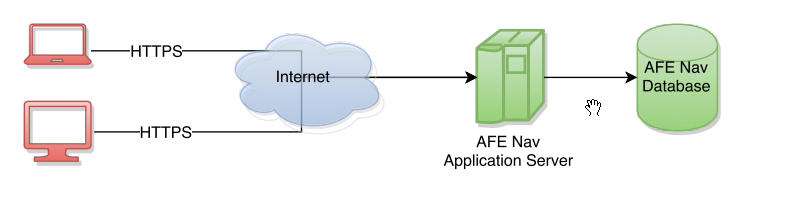
There are, however, additional layers of security such as VPNs and Proxy Servers that can create a more robust and layered approach to security.
Proxy Servers
It is possible to deploy Aucerna Execute behind another HTTPS proxy such as IIS or Apache. While doing this on its own has little effect on the overall security of the system it does open up some options that do. Remote devices could be, for example, configured with client-side SSL certificates (deployed by policy) and the proxy server could be configured relay traffic only where the request was initiated by a device with a valid client SSL certificate. This client SSL option gives a mechanism to protect the Aucerna Execute Service from the broader Internet while being seamless for the users.

VPNs
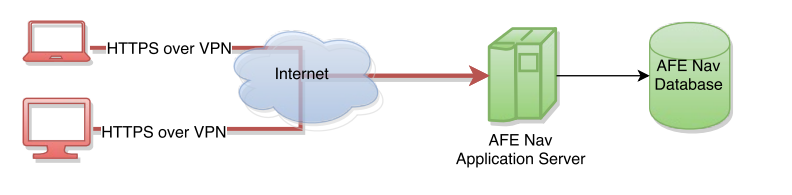
If possible, Aucerna Execute recommends using a VPN to provide access to Aucerna Execute to remote users. This puts dedicated security software between the Internet and the Aucerna Execute Service. The downside with this approach is that usually it is not seamless to the users. If users are forced to manually establish a VPN tunnel, prior to clicking on any links in Aucerna Execute’s email notifications, there is a significant degradation of the user experience. If, however, your infrastructure allows for remote devices to seamlessly establish encrypted tunnels on demand this approach is absolutely recommended.
Data Storage
All data is stored within an RDBMS (Oracle or SQL Server), and a network file share. Most configuration is stored within the RDBMS. Configuration for integration points are stored in configuration files on the Application Server. The RDBMS, network share, and application server are configured by the client and it is up to the client to ensure that those resources are appropriately locked down.
Database Connectivity & Authentication
Aucerna Execute stores all data (aside from attachments and IT level configuration) in a single schema under either Oracle or SQL Server. The Aucerna Execute Server connects to this database under a single “Service Account” and handles all database IO operations. The end-users do not require, nor should they have, access to the database credentials.
External systems integrating with Aucerna Execute through staging tables should use separate database accounts with access limited only to the staging tables they work with. Similarly external reporting tools should access the Aucerna Execute schema through separate read-only accounts.
The database connection string is stored in “config\database.config” on the Application Server. Only IT administrative users, and the Aucerna Execute Service should have access to this file.
Integration with External Systems
Aucerna Execute supports batch synchronization of AFE and master data (partners, areas, etc) with 3rd party tables through the use of staging tables. These staging tables can be placed in either the Aucerna Execute schema or an external schema. Database connection information (for staging tables in external schemas) is stored in a configuration file only accessible to users with access to the files under the application server (should be limited to IT and the Aucerna Execute Service user).
Aucerna Execute supports real-time integration with 3rd party systems via SOAP or messages over HTTP(S). We recommend HTTPS for transport level security. Out-of-the-box Aucerna Execute does not have support for any particular user authentication scheme and most clients lock down APIs at the host level. Integration is configured through files stored on the Application Server and should be accessible to IT administrators and the Aucerna Execute Service user only.
Attachments
Aucerna Execute stores attachments in a separate folder structure outside of the database. This folder structure is maintained automatically by Aucerna Execute and must not be writable by end-users. The permissions should normally setup so that only IT and the Aucerna Execute Service user have read/write access to the attachments folder and all other users are denied access. This provides the same access controls to the supporting document that the AFE already enforces (see View Permissions)
Cryptography
User passwords (when enabled) are salted (8-byte random salt) and hashed with SHA-256 prior to storing them in the Aucerna Execute database.
Aucerna Execute relies on libraries provided as part of the .NET Framework for cryptographic primitives (such as SHA-256 for passwords, RSA for licensing, and the cryptographic random number generator for generating authentication tokens).
All TLS/SSL operations are performed by the underlying HTTP.SYS stack and not Aucerna Execute. Cipher suites and ordering are provided by the underlying OS functionality and vary by version of Windows.