
AI Assistant
The AI Assistant is a conversational tool that lets you ask questions about PetroVR, get insights about the model you currently have open, import data from Excel models, and make changes to your project using natural language.
To get started, make sure the AI Assistant is licensed and enabled as described below, then select the AI Assistant button in the main toolbar.

Note that the AI Assistant connects PetroVR to a third-party AI service selected and provided by you or your organization. Please read the Disclaimer before using it.
Licensing
The AI Assistant requires a license separate from the base PetroVR license. Like other PetroVR add-ins, such as Monte Carlo Multi-Core or Calling Economics as a Service from PetroVR, it can be acquired as an add-on to your PetroVR license.
Enabling the AI Assistant
The AI Assistant is enabled through the PetroVR.INI file, which must contain the following lines:
[AI Assistant]
active=true
A new installation of PetroVR includes these lines by default. If they are not present, for example because PetroVR was upgraded rather than installed from scratch and the INI was not updated, add them manually. Place them after the last entry of an existing section (sections are defined by the names between square brackets).
Configuring the AI provider
The first time you use the AI Assistant you need to configure the connection to the Large Language Model (LLM) service. Open the Connection tab and complete the following fields:
[Image: AI Provider Configuration – Connection tab (use a generic URL, without the Workflows tab)]
- Provider: Select the AI provider. OpenAI and Anthropic are currently supported.
- URL: Enter the URL of the LLM service.
- API key: Enter the API key provided by your AI provider for your account.
- Model: Enter the LLM model to use.
Note that automatic model listing is not supported for Azure endpoints. In that case, enter the deployment name manually in the Model field.
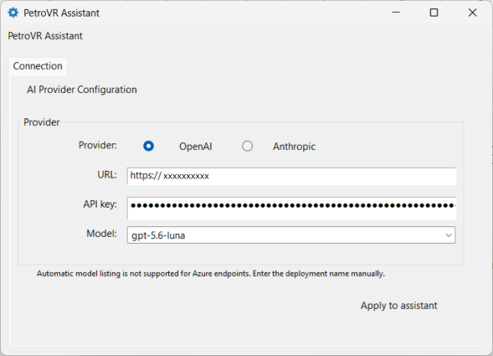
Select Apply to assistant to save the configuration and start using the AI Assistant.
Note that different LLM models may cause the AI Assistant to behave differently. Because of the probabilistic nature of AI, the same request may even produce different results from one occasion to another, and the behavior of the AI Assistant can be unpredictable. Always review the responses and proposed changes before accepting them.
What the AI Assistant Can Do
The AI Assistant covers the following use cases:
- Ask about PetroVR: The AI Assistant has access to the PetroVR Knowledge Base, so you can ask it how a feature or tool works.
- Get insights about your model: The AI Assistant can answer questions and provide insights about the PetroVR model currently open in your session.
- Import reservoirs and wells from Excel: Drag and drop one or more Excel files from Windows Explorer into the conversation box of the AI Assistant to import reservoirs and wells (with their declines curves) from Excel models.
- Make global changes: Ask the AI Assistant to modify variable values in a subset of wells, create user variables, or create functions that refer to the well in which they are located, among other global changes.
Changes Made by the AI Assistant
The AI Assistant always asks for your confirmation before making any change to your project. Review each proposed change carefully before accepting it.
Changes made by the AI Assistant are recorded in the Change.log, with AI Assistant registered as the author of the change. This means that you can review, revert, or cancel them from the Changes window like any other change. To learn more, see The Change System
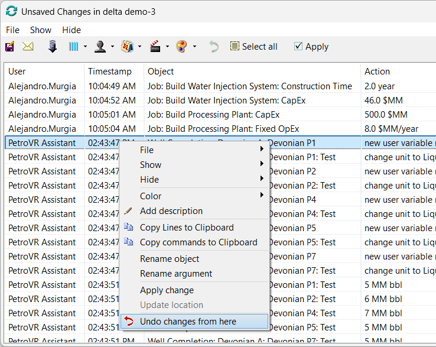
Note that AI-generated content may be inaccurate or incomplete. You are responsible for reviewing and verifying any AI-assisted change to your models and data.
Disclaimer
The PetroVR AI Assistant ("AI Assistant") allows users to interact with a third-party artificial intelligence service selected and provided by the user or the user's organization. It is provided for informational and assistance purposes only and does not constitute professional engineering, economic, investment, legal, or other professional advice.
Quorum Software does not provide, operate, or control the third-party AI service. Users are responsible for their own account and access to the AI provider, including any associated costs, and for complying with the provider's terms and policies. The availability and functionality of the AI Assistant may depend on the provider and may change or be discontinued at any time.
AI-generated content may be inaccurate, incomplete, or unsuitable for a particular purpose. Quorum Software makes no warranties or representations, express or implied, regarding the accuracy, reliability, or suitability of AI-generated content. Users are solely responsible for reviewing and verifying AI-generated content and any AI-assisted changes (including changes to PetroVR models and data) before relying on them for technical, financial, operational, or other decisions, and for maintaining backups of their work.
By using the AI Assistant, users acknowledge that they are responsible for all decisions and actions taken based on AI-generated content. To the extent permitted by the applicable PetroVR agreement and applicable law, Quorum Software shall not be liable for any loss, damage, or consequence arising from the use of or reliance on the AI Assistant, AI-generated content, or the third-party AI service.
Data Privacy and Security
Information submitted through the AI Assistant is transmitted to the user's selected AI provider and is governed by that provider's terms, privacy policy, retention practices, and security measures. Quorum Software is not responsible for the provider's handling or use of such information. Quorum Software's handling of personal data in connection with PetroVR is described in the Quorum Software Privacy Policy.
Users must not submit personal, confidential, proprietary, or other sensitive information unless they are authorized to share it with the AI provider and doing so complies with their organization's policies, contractual obligations, and applicable law (including data protection, data residency, and export control requirements).
By enabling or using the AI Assistant, users acknowledge this disclaimer, which supplements the PetroVR license agreement and the terms between the user and their selected AI provider.
See Support for support contact information.